Application and admission
Receive applications, check documents, arrange interviews and manage offers and approval. Recruiters can respond to requests through the Apply portal.
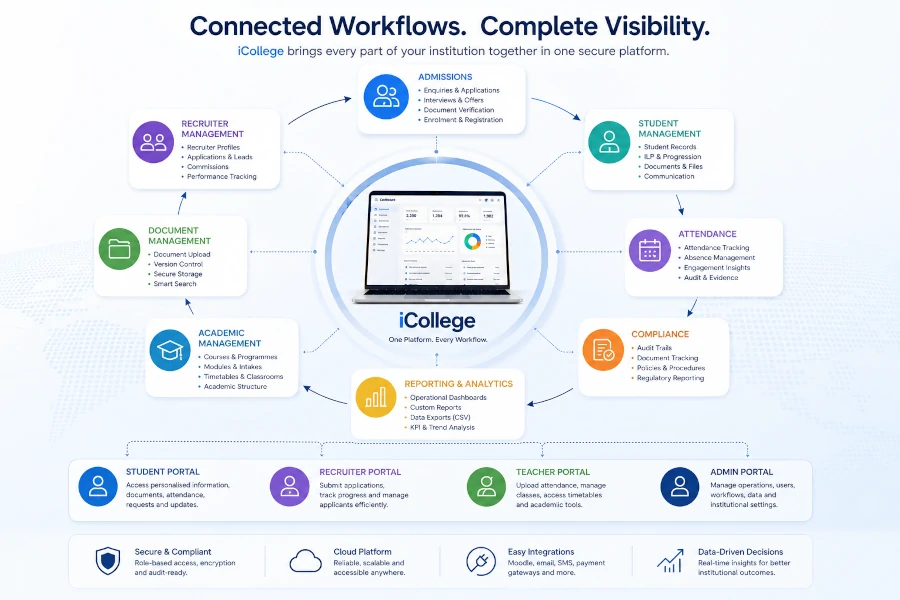
iCollege brings admissions, student records, attendance, academic management and reporting together in one platform for UK education providers. Give staff, teachers and recruitment partners the information they need at every stage of the student journey.
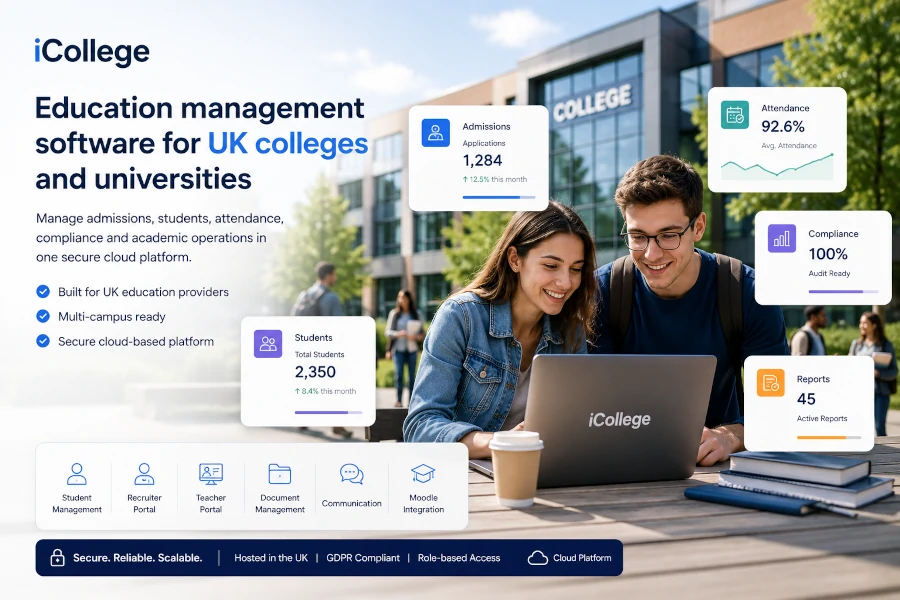
Follow each learner from their first application through registration, learning and completion. Keep the information and decisions from each stage connected.
Receive applications, check documents, arrange interviews and manage offers and approval. Recruiters can respond to requests through the Apply portal.
Move approved applicants into student management. Maintain registration history and preserve previous records when the course or campus changes.
Connect modules, learning plans, attendance, student reflections and teacher checkpoints. Record support referrals and follow-up actions.
Record progression, completion and other registration outcomes while retaining the student’s journey and supporting evidence.
Applications need checking, documents need following up and students need support throughout their studies. iCollege connects admissions, student services, teachers and management through shared records, so authorised teams can see what has happened and what needs attention next.
Keep documents, file checks, interviews, decisions, offers and communication within one controlled admissions workflow.
Give authorised teams a reliable view of student profiles, documents, registrations, attendance, communications and progress.
Use current admissions, attendance, demographic, teaching-time and awarding-body information to support decisions.
Manage online applications, evidence checks, interviews, approvals, conditional and unconditional offers, e-signatures and enrolment preparation.
Explore admissionsKeep profiles, documents, registration history, ILPs, absences, notes, letters, IDs, SMS history, Moodle engagement and feedback together.
Explore student managementOrganise courses, awarding bodies, intakes, classrooms, timetables, teaching activity and academic records in one place.
Explore academic featuresRecord class attendance, manage authorised absences and review participation. View Moodle engagement alongside student records where integrated.
Explore attendanceLet agents and sub-agents submit applications, provide missing documents, follow progress and stay included in relevant email and SMS updates.
Explore recruiter managementReview attendance, demographic, campus, course, intake, awarding-body, admissions and teaching-time information from current records.
Explore reporting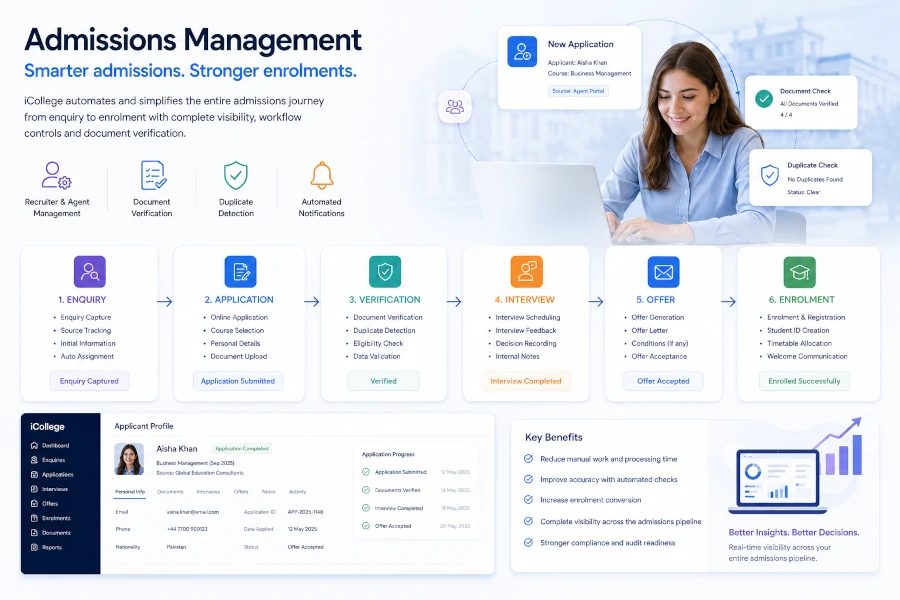
Give your admissions team a structured way to review applicants, request missing evidence and record decisions. Application details, documents and communications stay connected as the applicant moves through file checks, interviews, offers and approval.
Keep the student’s academic and administrative journey connected to their original application. Authorised staff can review personal details, next-of-kin information, documents, registrations and progress without searching across separate folders, inboxes or spreadsheets.
Make it easier for recruitment partners to work with your admissions team. Authorised agents can manage their own applicants and respond to requests in a dedicated workspace.
Explore the recruiter portalAttendance can help your college identify learners who may need support. Record participation against scheduled sessions and review individual and group attendance alongside authorised absences.
Explore attendance managementKeep a structured record of each student’s learning journey across academic years and terms. Use student reflections and teacher checkpoints to review progress and identify support needs.
Explore student managementOrganise the academic structure of your institution and connect teaching delivery with student records. Manage courses, modules, intakes, classrooms and study groups while maintaining oversight across campuses and academic partners.
Manage campus-specific courses, intakes, classrooms, timetables, students and reporting.
Plan teaching by campus, course and intake while allocating classrooms and teaching resources.
Connect qualifications and delivery records with awarding-body-specific reporting requirements.
View relevant Moodle activity alongside student and academic information where integrated.
Connect the people involved in running your college through access appropriate to their responsibilities.
A central workspace for authorised admissions, administrative and management staff to process applications, manage students and review operations.
A dedicated application portal for agents to submit applicants, provide evidence and follow the progress of their own applications.
Role-restricted access through the Office portal for relevant academic activities, attendance recording and student progress reviews.
A place for students to access the information and services available to them through your institution.
Bring operational information together so your managers and authorised staff can review activity across the student journey. Focus on the campus, course, intake or cohort relevant to your work.
Explore reporting and analyticsKeep supporting documents, registration changes, attendance history and communications organised. Role-based permissions and traceable records help authorised teams find evidence and support the institution’s record-keeping responsibilities.
Explore compliance managementConfiguration, data migration, training and launch are planned around your institution’s agreed requirements—not treated as an afterthought.
View packages and implementation pricingConfirm workflows, roles, campuses, courses, forms and reporting needs.
Prepare institutional structure, branding, forms and access permissions.
Map, validate and import the information agreed within your package.
Complete user preparation, acceptance checks and go-live support.
Follow a student journey from application to completion in a personalised demonstration. See how your admissions, student records and academic operations could work together.
Modules, integrations and implementation services depend on the selected package and agreed requirements.